Troubleshooting common issues
Popups (logins, cookies, CAPTCHA, etc.)
A common problem users can have when using LaVague is a failure to get past website pop-ups such as CAPTCHA, accepting cookies or logging in. While we are working on improving our agents' abilities to deal with pop-ups, we recommend the following two possible solutions:
🍪 Plugging in an existing browser session
When you run LaVague without a user_data_dir, a blank Chrome session is started, with no access to your usual logins, cookies preferences, etc.
However, you can change this and plug in your usual browser session with the following code:
from lavague.drivers.selenium import SeleniumDriver
driver = SeleniumDriver(headless=False, user_data_dir="/home/<YourUsername>/.config/google-chrome")
This will avoid you needing to log in again or re-submit cookies preferences etc. on sites you already use, which can greatly reduce the likelihood of popups causing issues when using LaVague.
User_data_dir path
You will need to substitute the path supplied to the user_data_dir with the correct path for your browser profile.
Here are the default paths on Windows, Linux and OSX:
- Windows:
C:\Users\<YourUsername>\AppData\Local\Google\Chrome\User Data - Linux:
/home/<YourUsername>/.config/google-chrome - OSX:
/Users/<YourUsername>/Library/Application Support/Google/Chrome
Manual interactions for pop-ups
When using a driver in non-headless mode, you can manually take actions on that webpage. Where you know you will need to login to a site or accept cookies for example, you can manually add a pause in your code to allow you time to manually accept cookies or log in:
agent.get("https://www.bbc.co.uk")

import time
time.sleep(5)
time.sleep(5)

agent.run("What is the weather in Birmingham")
WebDriver exceptions
If you have errors in your trace relating back to selenium.common.exceptions and DevToolsActivePort, this should be due to errors using the Selenium Web Driver in your environment.
An example of a common Selenium error would be:
selenium.common.exceptions.SessionNotCreatedException: Message: session not created: Chrome failed to start: exited normally.
(session not created: DevToolsActivePort file doesn't exist)
(The process started from chrome location /home/user/.cache/selenium/chrome/linux64/126.0.6478.55/chrome is no longer running, so ChromeDriver is assuming that Chrome has crashed.)
Environment without GUI support
The error above was caused by running LaVague in non-headless mode in an environment without GUI support.
If you are using an environment without GUI support, you will need to ensure your driver is set to headless mode with the following code:
driver = SeleniumDriver(headless=True)
When using headless mode, you can activate a display mode to display real-time updated screenshots of the agent's progress. This works well in Google Colab.
agent.run("Print out the name of this week's top trending model", display=True)
Running LaVague on Windows Subsystem for Linux 1
LaVague may be incompatible with WSL1 due to its compatibility issues with GUI applications.
This can be resolved by updating to WSL2.
Running LaVague with replit.com
To get LaVague working in a replit.com environment, you will need to add the following packages to the replit.nix file:
{pkgs}: {
deps = [
    pkgs.geckodriver
        pkgs.python38Full
        pkgs.chromium
        pkgs.chromedriver
];
}
To access the replit.nix file, you'll need to click on
show hidden files.
Then you can use LaVague with the Selenium Driver set to headless mode.
from lavague.core import  WorldModel, ActionEngine
from lavague.core.agents import WebAgent
from lavague.drivers.selenium import SeleniumDriver
import os
my_secret = os.environ['OPENAI_API_KEY']
selenium_driver = SeleniumDriver(headless=True)
world_model = WorldModel()
action_engine = ActionEngine(selenium_driver)
agent = WebAgent(world_model, action_engine)
agent.get("https://huggingface.co/docs")
ret = agent.run("What is the top model?")
print(ret.output)
Make sure to add lavague to your dependencies list in your pyproject.toml.
[tool.poetry.dependencies]
python = ">=3.10.0,<3.12"
lavague = ">=1.1.3"
Navigation errors
Another common issue some users face is Navigation errors:
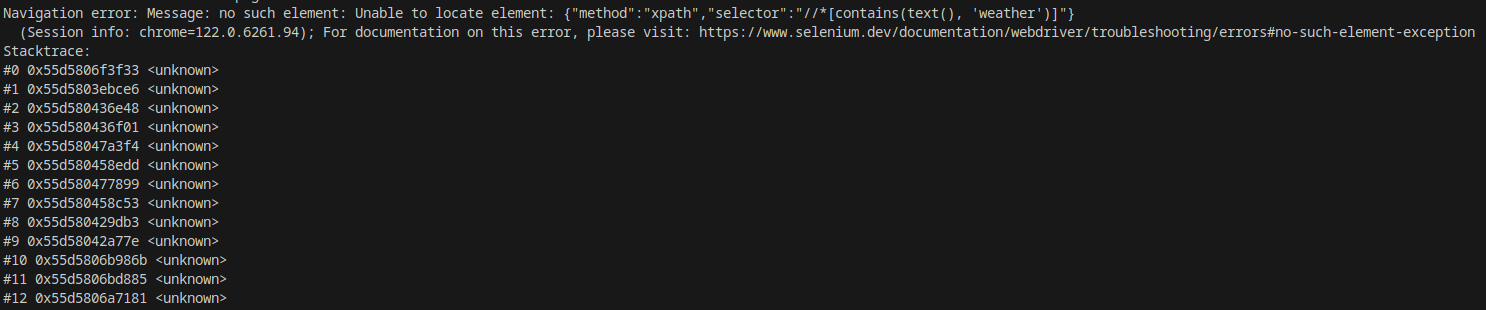
These errors mean that the Navigation Engine did not successfully generate the correct Selenium code needed to interact with the element of the web page needed to achieve its instruction.
There can be several reasons for this and this can often be fixed by modifying options relating to the World Model, Retriever or Action Engine.
For a guide on how to debug navigation errors, see our debugging guide (coming soon).